

Navigate your field service business by the numbers
Contractor Compass 360 turns everyday financial and operational data into clear direction for faster, better business decisions.
- Track what drives profit
- Spot trouble early
- Uncover hidden patterns
Profitable growth starts
with clear direction
Use Contractor Compass 360 to measure progress, expose weak spots, and keep your business moving forward.
Confident growth does not come from selling more at any cost. It comes from seeing what is actually working, protecting your margins, and making sure the business grows stronger, not just bigger. Contractor Compass 360 helps you grow with clarity, discipline, and control.
Smarter decisions start when the numbers are clear and easy to trust. Contractor Compass 360 shows what changed, where performance is slipping, and where to act next, so you can stop relying on assumptions and start managing with facts, timing, and purpose.
Trends tell you where the business is headed before the damage is done. Contractor Compass 360 helps you spot shifts in performance early, so you can correct problems faster, stay ahead of slowdowns, and make smarter moves while there’s still time.
Core KPIs
Comparison view
Better visibility
Customizable

Let the numbers
point the way
Track the core numbers that show where you're winning, where you're slipping, and what needs immediate attention.

Catch bad trends before
they spread
When the numbers are easy to read, bad patterns are harder to miss. Contractor Compass 360 gives you side-by-side year-over-year visibility and trend signals that make it easier to spot slowdowns, margin pressure, and underperformance before they spread across the rest of the business.
-
Spot the warning signs early
-
Compare results quickly
-
Stay ahead of slowdowns


-
See what changed
-
Know why it changed
-
Defend every decision
Make decisions you can defend with facts
Data-driven facts make tough calls easier to stand behind. Contractor Compass 360 gives you a clear view of what changed and where performance is moving, so you can make pricing, staffing, and operational decisions with more confidence and a lot less second-guessing.
-
Track what standard tiles miss
-
Build cards by role
-
Show prior-year context
Build custom cards with
your own formulas
Every shop has a few numbers that tell the truth faster than anything else. Custom formula cards let you build those into the dashboard using your own formulas, so you can stop working around standard tiles and start tracking what really matters to your business.


-
Show only what matters
-
Keep priority KPIs visible
-
Reorder tiles your way
Organize the dashboard
to fit your business
A good dashboard should be easy to read and easy to use. Contractor Compass 360 lets you control the layout, tile order, spacing, themes, refresh settings, and visual grouping, so the right numbers are easier to find and harder to ignore.
Full feature list
- Year-over-year KPI comparisons
- Current-value KPI cards
- Prior-year KPI benchmarks
- Change tracking by metric
- Percent-change tracking
- Positive trend indicators
- Negative trend indicators
- Neutral trend indicators
- Light and dark themes
- Active company indicator
- Revenue KPI tracking
- Gross profit KPI tracking
- Net profit before tax
- Cash flow trend tracking
- Sales lead tracking
- Revenue per employee
- Gross profit per employee
- Average ticket tracking
- Custom gauge settings
- Windows notifications
- Billable-to-unbillable labor ratio
- GAAP-based accrual reporting
- Raw KPI value visibility
- Accurate live KPI dashboards
- Fully custom dashboard views
- Saved dashboard profiles
- Department-filtered dashboards
- Multi-department KPI rollups
- Manual dashboard refresh
- Auto-refreshing dashboard
Built for whichever platform you use
No matter which platform you prefer, Contractor Compass 360 keeps the business pointed at the right numbers.

Available Now
Run the office with a complete contractor management system built for accounting, payroll, dispatching, job costing, and clear reporting.

Coming Soon
Run the whole business from one connected platform built to streamline operations across the office, the field, and the customer experience.
The facts behind Contractor Compass 360
No sales pitch here. Just the facts about how Contractor Compass 360 helps you run by numbers.
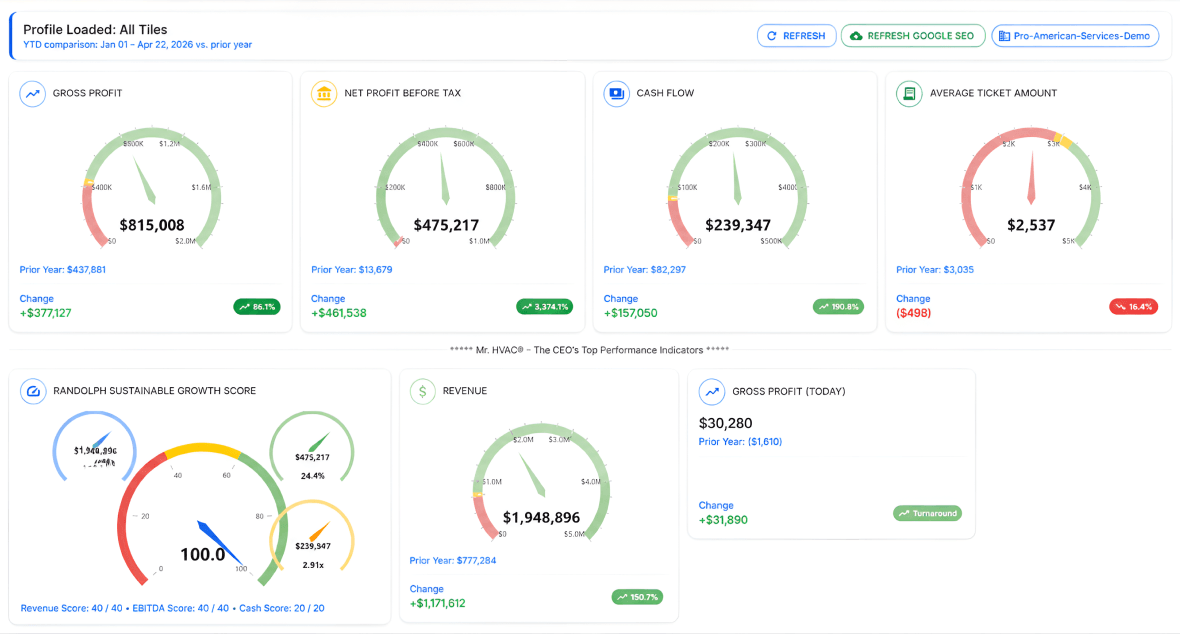
Contractor Compass 360 is a year-over-year business performance dashboard inside Total Office Manager. It shows your key numbers in one place so you can see where you are, where you were, and whether the business is moving in the right direction.
It helps you stop managing by opinion. You can see what changed, how much it changed, and whether the trend is improving or slipping. That gives you a better shot at fixing problems early and pushing harder where the numbers say you should.
The dashboard covers core contractor numbers like revenue, gross profit, net profit before tax, cash flow, sales leads, revenue per employee, gross profit per employee, average ticket amount, and billable versus non-billable employee ratios. It also includes a long list of underlying values used to build those KPIs.
It uses trend icons and percent chips to show positive movement, negative movement, or no meaningful trend yet. In plain English, it gives you warning signs sooner, before a bad pattern gets expensive.
Yes. You can show or hide tiles, reorder them, add divider lines, save profiles, turn on compact spacing, control animation and hover effects, and set refresh options. The dashboard is meant to fit how you manage, not force you into one canned view.
HVAC software is a specialized tool designed to simplify and Yes, and that matters. You can turn on department-based results, choose one or more departments, and have the dashboard total the matching department rows into KPI values. That lets you look at the company as a whole or break the numbers down where the problems really live.streamline the daily operations of HVAC businesses. Whether you’re scheduling jobs, dispatching technicians, managing invoices, or tracking inventory, it provides a single, organized platform to handle everything with ease. Think of it as the command center for your business, keeping your office, field, and customer interactions running smoothly.
The right HVAC software does more than just organize—it transforms how you work. It helps you schedule and dispatch jobs in real-time, so your technicians spend less time waiting and more time working. It tracks invoices, payments, and even payroll, so your books stay clean and accurate without needing extra software like QuickBooks. And because it’s designed specifically for HVAC, it includes tools tailored to your industry, like inventory tracking for parts and equipment, customer relationship management (CRM) features, and even mobile access for your team in the field.
In short, HVAC software helps you work smarter, not harder. It saves time, reduces errors, and gives you the tools to grow your business profitably. Whether you’re just starting or running a large operation, it’s the tool every HVAC pro needs to stay ahead of the competition. After all, who wants more stress when you can have more success?
The dashboard pulls from your Total Office Manager database and uses a stored procedure to build the numbers. So the dashboard itself is not guessing. But like any reporting tool, the output is only as good as the bookkeeping, setup, and data going in.
No. It launches from Total Office Manager and does not require a separate database connection or a separate login. That is the way it should be. One system. One place to work from.
In Total Office Manager, go to Reports > Contractor Compass 360. That opens the dashboard. Nothing fancy. Just go to the menu and open it.
Yes. You can move tiles up or down and add divider line tiles to create sections. That lets you organize the dashboard in a way that matches how you think through the business.

