What is Service Scheduling Software?
If you run a field service business, you already know the chaos that comes with juggling technicians, customer calls, and urgent jobs. You might be using a whiteboard, a spreadsheet, or simply trusting your memory to hold it all together.
Service scheduling software is the system that replaces that chaos with a real dispatch board. It lets you book jobs, assign the right technician, set time windows, and see your day (or week) in one place so the schedule runs the business instead of the business running the schedule.
A good scheduling platform also keeps the work moving in the field by tying the schedule to the job itself:
- tech availability and skill-based assignments
- job details, notes, and history attached to each appointment
- updates, reminders, and status changes that everyone can see
For decades, Aptora has built software specifically for contractors like you. Our service scheduling software isn’t just a digital calendar – it’s the command center that connects dispatch, technicians, and customers. This guide will walk you through what to look for and how to get the most out of the right system.
Understanding Field Service Scheduling Software
What exactly are we talking about? Field service scheduling software is a specialized tool designed to manage the complexities of sending employees to customers’ locations. It’s different from a standard appointment app because it has to handle variables like traffic, technician skills, parts availability, and equipment tracking.
The Old Way vs. The Smart Way
Think about how you schedule now. It might look like this:
- Customer calls with a problem.
- You check a paper map or mental list of who is nearby.
- You write the job on a dry-erase board.
- The technician calls in for the address.
- You hope they have the right parts.
With dedicated service technician scheduling software, that same process becomes:
- Customer call pops up on screen with full history.
- The software automatically finds the closest, most qualified tech.
- The job is dispatched to their mobile device with directions and job details.
- The system knows if that tech already has that specific part on their truck.
Why Your Accountant Should Care About This
Your accountant or financial advisor will love this software for one big reason: profit leakage. When technicians drive inefficient routes, you burn fuel and lose billable hours. When jobs are scheduled with the wrong skill level, you risk callbacks that cost you double. Good job scheduling software plugs these leaks by optimizing your most expensive assets – your people and your trucks.
Key Features of Service Technician Scheduling Software
Not all scheduling tools are created equal. You need a system built for the field, not a generic calendar. Here are the non-negotiable features we’ve built into our system at Aptora based on thousands of contractors.
Visual Dispatch Board
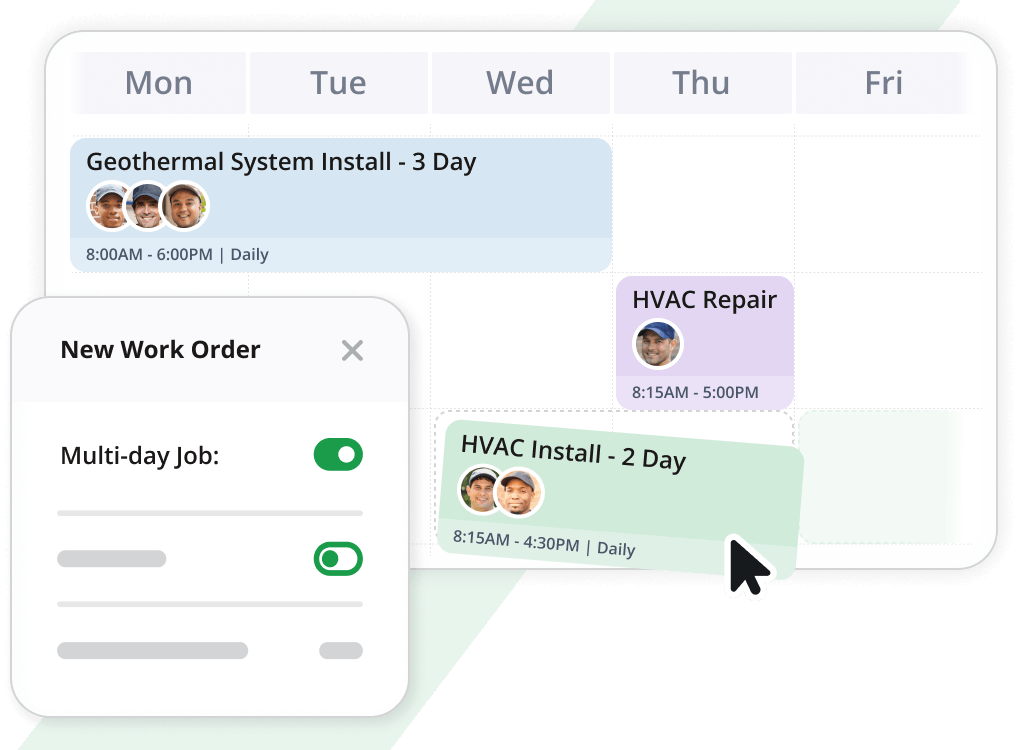
The heart of the system is the dispatch board. It should open quickly and show you everything at a glance. You need to see who is available, who is running late, and what jobs are pending.
- Look for drag-and-drop functionality to move jobs easily.
- Color coding is essential. We let you set colors by job type (service, install, sales), priority, or status.
- You should be able to hover over any job to see customer details, job notes, and equipment history without opening a new screen.
Smart AI Scheduling Wizard
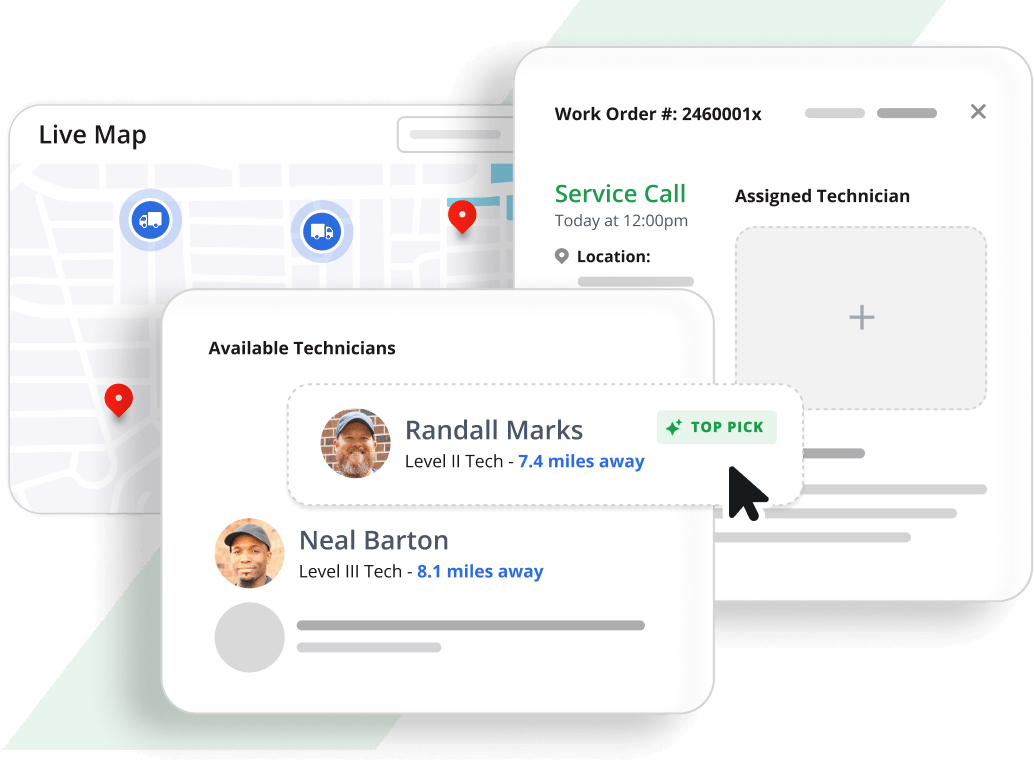
This is where technology really pays off. You don’t want to just assign jobs; you want to assign them optimally. Our AI-powered wizard considers:
- The technician’s current skill set and certifications.
- Their real-time GPS location.
- Current traffic patterns to the job site.
- Their estimated time of completion on the current job.
The system recommends the best person for the job instantly. It’s like having a veteran dispatcher who knows every street and every tech’s strengths, working 24/7.
Real-Time GPS and Routing
Paper maps are gone. Your dispatch board should integrate with live mapping.
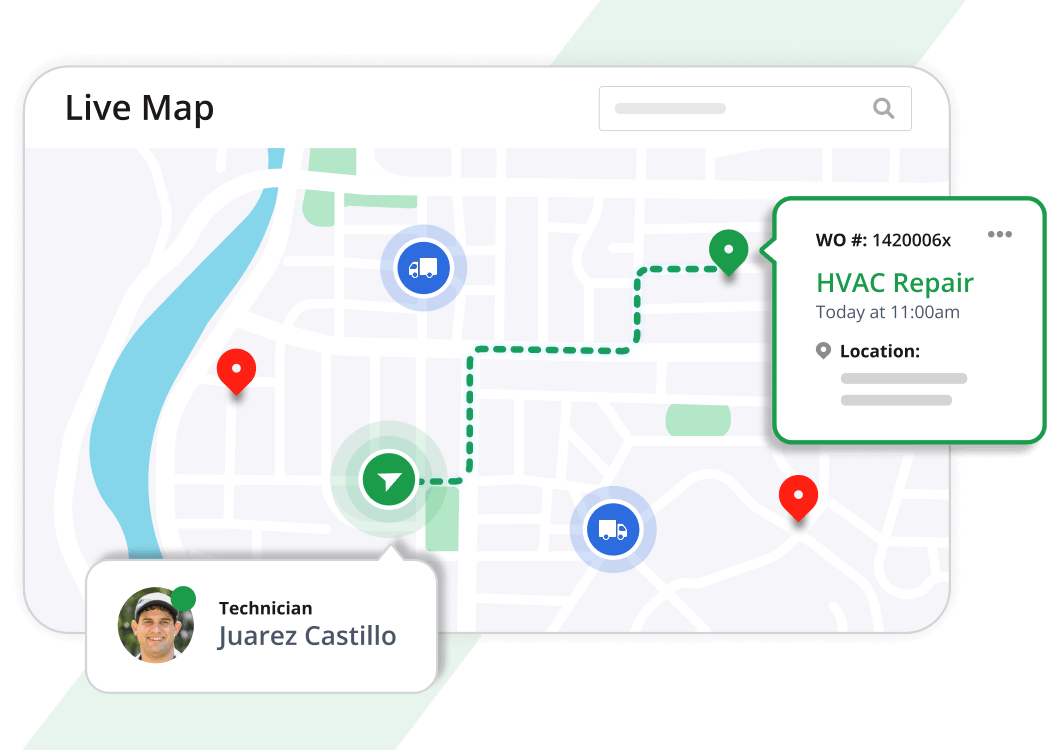
- See the exact location of every technician on a live city map.
- The software calculates drive time based on actual traffic, not just distance.
- This allows you to make “while you were in the neighborhood” sales calls or emergency service much more profitable.
Conflict Checking and Skills Verification
Nothing ruins a day faster than sending a tech who can’t do the work, or discovering the special tool they need is on another truck across town. Your software should prevent this.
- Skills Check: The system warns you if you’re assigning a job that requires a license or certification the tech doesn’t have.
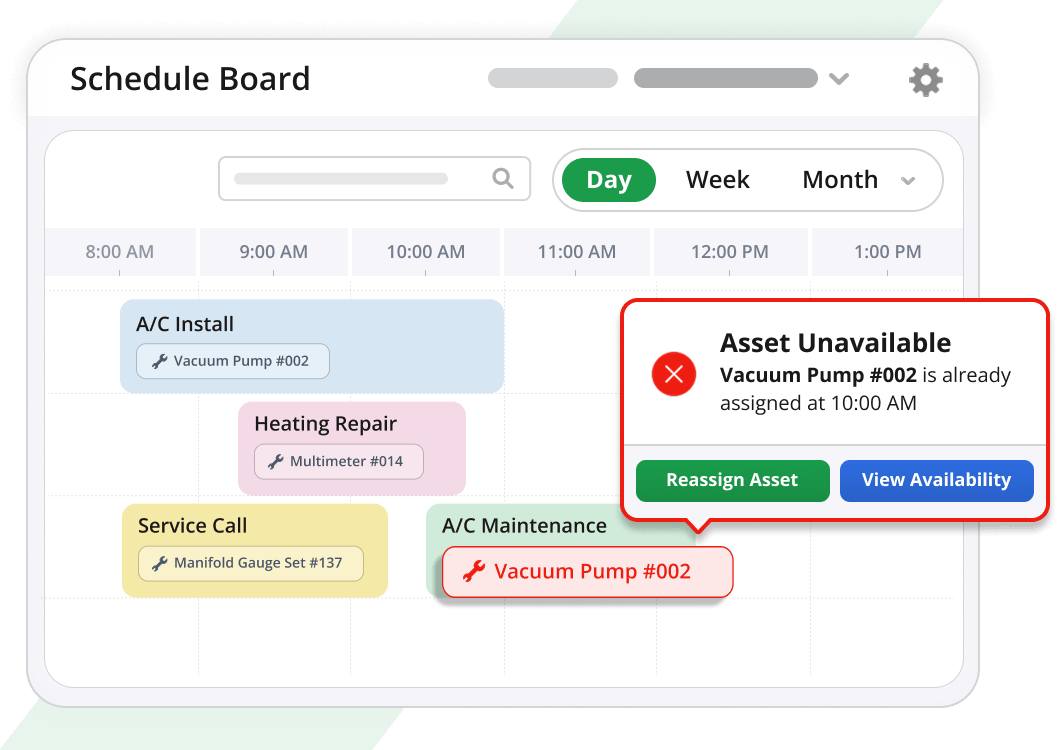
- Asset Scheduling: You can schedule tools, trailers, or heavy equipment to specific jobs. The software will flag it if you try to double-book that asset.
Comprehensive Work Order Management
The schedule board is just the entrance. Behind every appointment is a powerful work order. Your system should let you:
- Create detailed work orders with problem codes, descriptions, and customer directions.
- Track status from “Scheduled” to “Enroute” to “Working” to “Complete” and “Invoiced”.
- Attach required parts lists to ensure the tech brings everything needed the first time.
- Set recurring work orders for maintenance agreements automatically.
How Scheduling Software Integrates with Your Business
A common mistake is buying software that only does scheduling. Your schedule is connected to your customers, your inventory, and your money. If those pieces don’t talk to each other, you’re still doing double the work.
Seamless Payroll Integration
Here’s a feature your accountant will appreciate. When a technician marks a work order as complete, the time they spent should automatically populate their timesheet. Our system is fully integrated with payroll.
- No more collecting paper time cards.
- No more guessing which job they were on when.
- Overtime is flagged immediately, helping you control labor costs before payday.
From Work Order to Invoice in Seconds
The job isn’t done until you get paid. The best field service scheduling software eliminates re-keying data.
- When the job is complete, you convert the work order to an invoice with one or two clicks.
- All labor, parts, and materials used are already there.
- This ensures everything gets billed and nothing is forgotten.
Customer History at Your Fingertips
When a regular customer calls, your dispatcher should see their entire history immediately.
- View all past service calls by date, including what was done and by whom.
- Track equipment by serial number, including installation date and warranty status.
- See if the customer is on a service agreement or has a credit hold that needs attention before you dispatch.
Choosing the Right System for Your Business
You have options. Some software is cloud-only, some is installed on your own servers. Some is basic, some is comprehensive. Here’s how to decide.
Hosted vs. On-Premise
We offer both because different businesses have different needs.
- Hosted (Cloud) Software: This is the easiest to implement. Lower upfront costs, no IT worries, and we handle all backups and maintenance. You access it from any web browser.
- On-Premise Software: Some owners prefer to host the data themselves. Our system allows technicians to run a full copy of the software on laptops in the field, syncing back to the office. Everything that can be done in the office can be done from the truck.
The Mobile Component
Your technicians are in the field, so your software must work there too. Look for a dedicated mobile app or a mobile-friendly web interface.
- Techs should be able to see their daily schedule.
- They need to update job status in real-time.
- They should be able to look up repair history or service agreement info while standing at the customer’s equipment.
- Reminders should push to their mobile device so they never forget a task.
Pro Tip: Before you buy, map out your three most common job types (like a simple repair, a maintenance check, and a new installation). Ask software vendors to show you, step-by-step, how their system handles each one from the initial phone call to the final invoice. If they can’t show you clearly, it’s not the right fit.
Common Questions About Implementation
Will My Dispatchers Hate It?
Change is hard. But a good system actually makes their job easier. Instead of constantly answering “Where’s my tech?” calls, they have a live board that shows everything. Instead of chasing down information, it’s all in one place. The key is proper training. Look for software that offers dedicated support and has hundreds of configuration options so you can set it up to match your workflow, not force you to change your workflow to match the software.
How Does It Handle Multiple Departments or Locations?
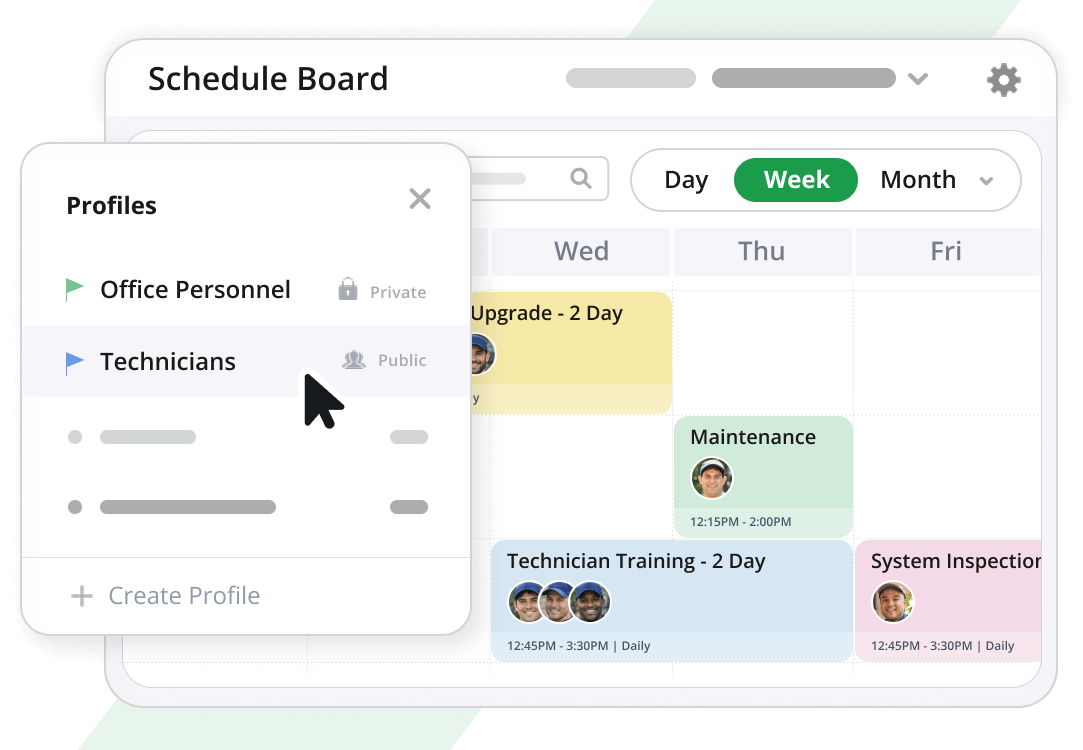
If you have separate plumbing and HVAC divisions, or multiple branches, your software needs to handle that complexity. You should be able to create custom views or “profiles.”
- Set up a profile that only shows your plumbing techs.
- Create another profile for the electrical department.
- Switch between them instantly.
- You can even set up profiles for different types of work, like “Installations This Week” or “Emergency Calls Only.”
Can I Offer Customers Specific Time Slots?
Absolutely. And you should. Customers hate waiting around all day. Your software should let you create predefined time slots (like 8 AM – 12 PM, or 1 PM – 4 PM). You can assign jobs to these slots, which makes scheduling easier for you and more convenient for your customer.
For more information on the fundamentals of running a service business, the U.S. Small Business Administration offers excellent resources on managing business finances. Additionally, understanding labor regulations is crucial when scheduling technician hours; the Department of Labor’s elaws website provides guidance on wage and hour laws.
Ready to Modernize Your Service Business?
Moving from a manual scheduling method to dedicated service scheduling software is one of the most profitable steps you can take as a business owner. It brings order to the chaos of the field, ensures your best people are doing the right jobs, and connects your operations directly to your accounting.
At Aptora, we’ve built Aptora 360 specifically for contractors like you. Our schedule board isn’t an afterthought – it’s the core of the system, trusted by companies dispatching thousands of calls a day. It includes everything we’ve discussed: the AI wizard, the GPS routing, the conflict checking, and the deep integration with payroll and invoicing.
Your goal is to grow a profitable, organized business. Our goal is to give you the tools to do it. If you have questions about how to apply these principles to your specific company, I encourage you to reach out and see how a purpose-built system can change the way you work.








Truly powerful software that captures a ton of important data that can be used to optimize your service business.
Michael King CFO & CPA