

Lead Management Software
Convert more leads into service calls
Turn incoming calls, forms, and referrals into real appointments your technicians can run today.
Key Features of Lead Management
Capture demand and book more calls
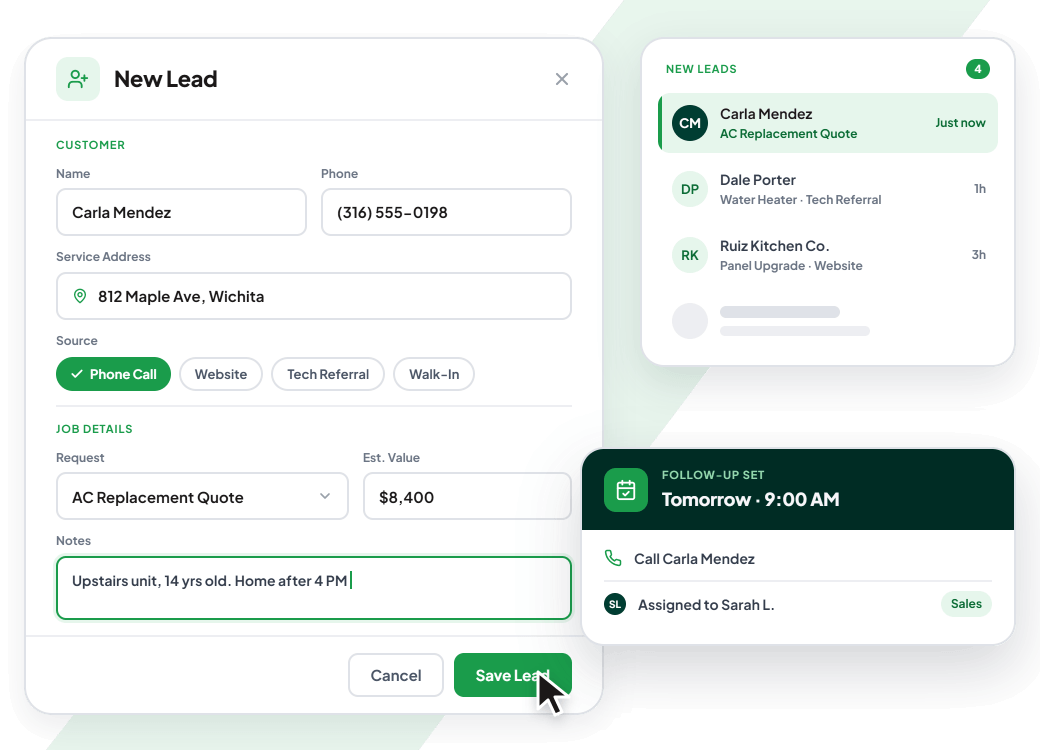
Capture new leads before the next shop wins the job
Give office staff and techs a steady way to enter leads, record the job details, and keep every opportunity ready for follow-up.
- Capture fresh service opportunities
- Log customer and job details
- Keep follow-up moving forward
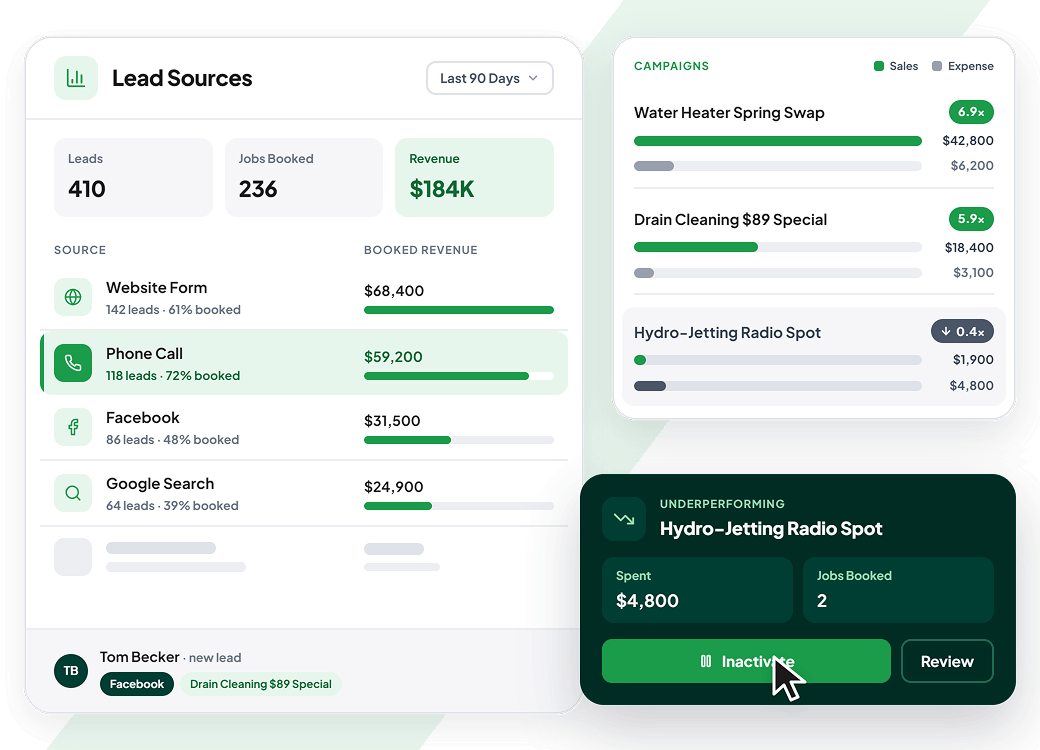
See exactly where every good lead came from
Tie leads to sources and campaigns, then give owners a clearer read on which marketing keeps techs booked and revenue moving.
- Track every marketing source
- Compare campaign sales and expenses
- Cut underperforming ad spend
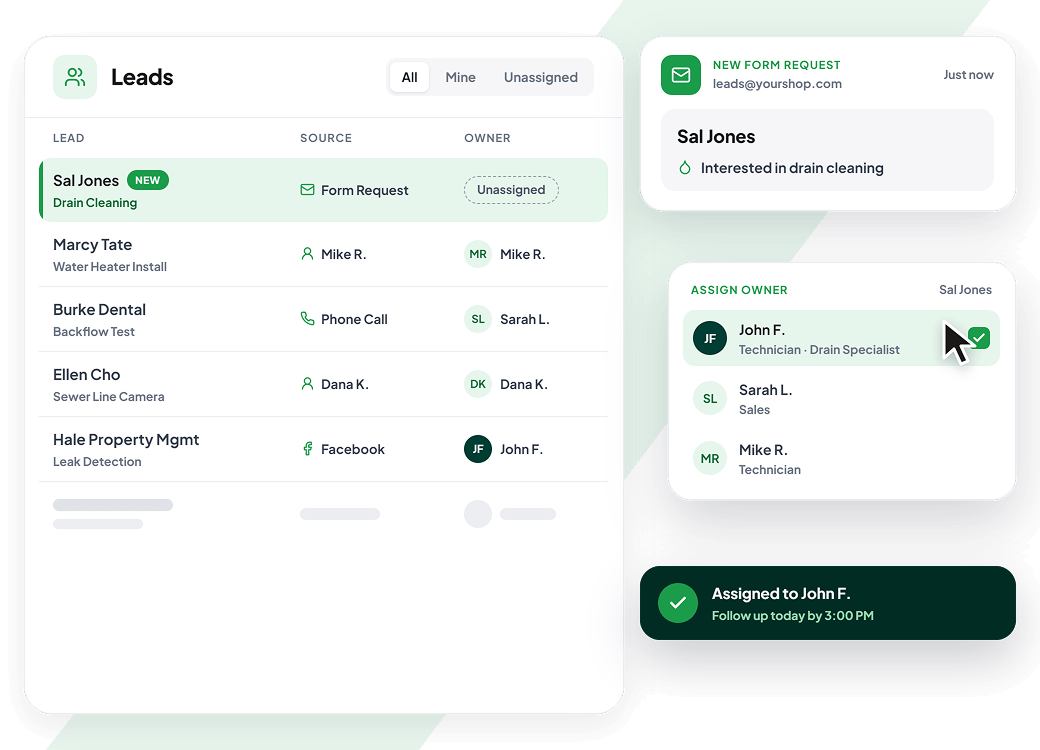
Give every service lead a clear owner from day one
Assign leads to the right person, track who brought them in, and make follow-up responsibility clear so your office knows who is responsible before the lead goes cold.
- Track employee-generated leads
- Keep follow-up owned
- Reduce dropped handoffs
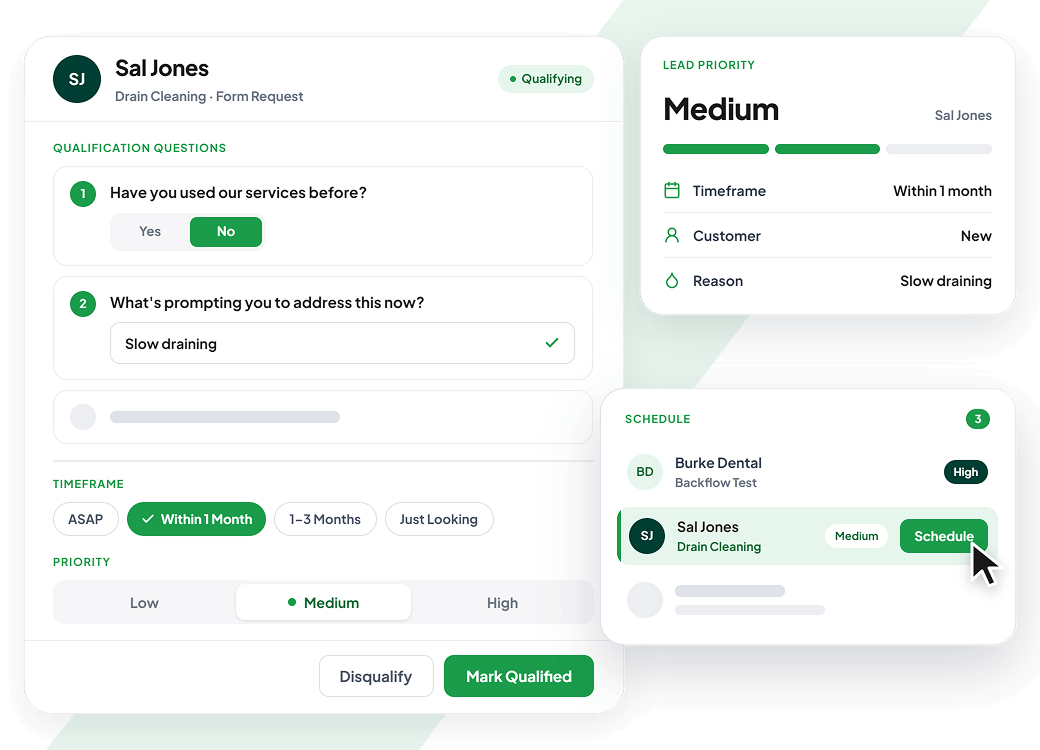
Separate real leads from tire-kickers before the truck rolls
Use qualification questions, priority, and job timeframes to spot serious prospects, chase the right work, and keep your office focused on calls worth booking.
- Qualify leads with set questions
- Track the customer’s buying timeframe
- Push better calls toward booking
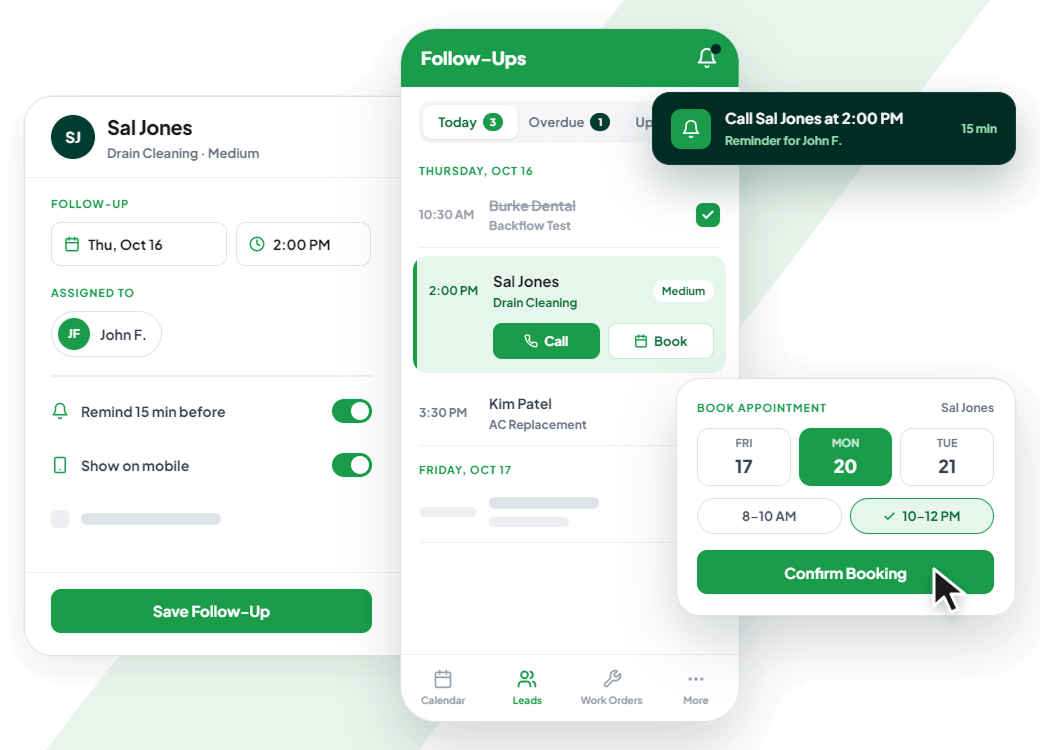
Turn hot prospects into booked calls before they cool
Keep sales opportunities from falling through the cracks with follow-up dates, mobile visibility, reminders, and appointment scheduling built for busy service teams.
- Surface follow-ups in mobile
- Keep reminders tied to users
- Keep callbacks from slipping
0
X
faster billing and cash collection cycle
0
%
average revenue growth in year one
Run your entire field service business on one unified platform without duct tape

“I built Aptora because contractors deserve better than pieced-together software. Aptora is the only true all-in-one system, built from the ground up to run your entire business without duct tape.”

Mr. HVAC
Founder, Aptora Corporation
Explore solutions for your trade
Support that goes beyond software
At Aptora, we believe in the value of direct, knowledgeable support. That’s why all technical support is performed in-house by trained professionals with ongoing education.
What is Lead Management Software for Contractors?
Lead management software is a tool that helps you capture every potential customer inquiry, track where each lead stands in your sales process, and make sure nobody falls through the cracks.
Think of it as your digital assistant that never forgets a lead.
For contractors specifically, lead tracking software needs to handle a few unique things. You’re not selling a subscription service or a digital product. You’re selling a service call, an estimate, and eventually a completed job. The software needs to mirror that real-world process.
Here’s the core workflow that good lead management software should support:
- Capture – Leads come in from phone calls, website forms, email, walk-ins, and referrals
- Qualify – You determine if the lead is worth pursuing based on budget, urgency, location, etc.
- Assign – You route the lead to the right salesperson or technician
- Track – You monitor follow-ups, appointments, and proposal status
- Nurture – You stay in touch with leads that aren’t ready to buy yet
- Convert – You turn the lead into a paying customer and eventually a work order
What Aptora 360 provides: Our sales management software handles the entire lifecycle from first touch to signed contract. You enter the lead once. From there, you assign stages, set follow-up reminders, attach estimates, and track every interaction. When the lead converts, you turn it into a work order with one click – no re-entering data, no copying and pasting.
Why Generic Software Fails for Field Service Businesses
You might be thinking, “Can’t I just use a spreadsheet or a basic CRM?” Sure, you could. But here’s why that approach usually falls apart for contractors.
Spreadsheets are manual time-sucks.
You have to enter every lead by hand, update statuses constantly, and try not to overwrite someone else’s changes. One person forgets to update a cell, and suddenly you’re double-calling a prospect or missing a follow-up entirely.
Most CRMs weren’t built for field service.
CRMs track deals and pipelines, sure. But they don’t understand that your lead needs a dispatched technician, a truck stocked with specific parts, and a flat-rate pricing quote created in ten minutes.
You end up juggling multiple tools.
Your calendar is in one app, your leads are in a spreadsheet, your estimates are in another system, and your dispatcher is working off a whiteboard. Chaos.
That’s why field service lead management software needs to talk to the rest of your business. Your lead system should connect to your scheduling board, your inventory, your pricing engine, and your invoicing.
What Aptora 360 provides: We built Aptora 360 as an all-in-one platform specifically for field service contractors like you. That means your sales leads, estimates, work orders, invoices, and customer history all live in the same database. No duct tape. No spreadsheets. No “integrating” five different apps with Zapier.
Core Features of Field Service Lead Management Software
Lead Capture: Stop Losing Inquiries Before They Start
Lead capture is where it all begins. Every time a potential customer reaches out – whether by phone, email, website form, or walking through your door – that information needs to go into your system immediately.
Here’s what solid lead capture looks like for a contracting business:
- Phone calls – The person answering knows how to capture name, number, service needed, and urgency before hanging up
- Website forms – Your website sends lead data straight to your software, not to someone’s personal email inbox
- Email inquiries – You can forward emails into your system or have them automatically create leads
- Walk-ins – Front desk staff can enter the lead in under 30 seconds
- Referrals – Existing customers can submit referrals through a customer portal
What Aptora 360 provides: Our system integrates with caller ID, so when a lead calls, you see their history instantly on screen – whether they’re a new prospect or a past customer with an open lead. Your website forms can feed directly into the Sales Opportunity Manager. And for walk-ins, the lead entry form takes less than a minute to complete. Every lead goes straight into your central database, no manual data entry required.
Lead Tracking: Know Exactly Where Every Prospect Stands
Once you’ve captured a lead, you need to track it. This sounds simple, but it’s where most contractors fall apart. Without a tracking system, you’re relying on memory and sticky notes. Lead tracking software solves this by giving you a clear view of every lead in your pipeline.
You should be able to see at a glance:
- Who the lead is and how they found you
- What stage they’re in (new inquiry, estimate scheduled, proposal sent, etc.)
- When you last contacted them
- What the next step is and when it’s due
- Which salesperson or technician is assigned
Good lead tracking software also helps you measure what’s working. You can see which marketing channels generate the most leads, which salespeople close at the highest rates, and which types of jobs are most profitable.
What Aptora 360 provides: The Sales Opportunity Manager gives you a graphical view of every sales lead, displayed right alongside your dispatch board. You assign each lead a stage and a probability of closing. The contact log tracks every phone call, email, and appointment – all date and time stamped with the person who made the entry. You can filter leads by salesperson, marketing source, region, or any other custom field you set up.
Lead Qualification: Separate Tire-Kickers from Serious Buyers
Lead qualification is the process of figuring out which leads are worth your time and which ones aren’t. You don’t need to spend an hour qualifying every lead. In fact, you can do most of this in the first 60-second phone call.
Once you qualify a lead, you can score them – hot, warm, cold. Hot leads get called back immediately. Warm leads go into a follow-up sequence. Cold leads go into a nurture list for future marketing.
What Aptora 360 provides: Our system lets you create custom qualifying questionnaires that pop up when you enter a new lead. You can set up a probability list to predict the likelihood of closing each sales opportunity. And you can define sales process stages that match your actual workflow, so every lead gets the right level of attention at the right time.
Lead Assignment: Get Every Lead to the Right Person
You’ve captured the lead and qualified it. Now it needs to go to the right person. For a contracting business, lead assignment can get complicated. Some leads need a salesperson. Other leads just need a technician. You need a system that routes each lead appropriately.
What Aptora 360 provides: You can assign sales leads to specific salespeople, technicians, or teams. The dispatch board displays sales leads alongside work orders, so your dispatcher sees everything that needs attention – urgent service calls and sales appointments together. You can track sales information by salesperson, including closure rates, so you know who’s performing and who needs coaching.
Lead Nurturing: Stay Top-of-Mind Until They’re Ready to Buy
Not every lead is ready to buy today. Some prospects are just starting their research. Others are waiting for budget approval. A few might not need your services for six months. If you give up on these leads after one call, you’re leaving a mountain of revenue on the table.
Lead nurturing is the process of staying in touch with leads who aren’t ready to buy yet. You provide value, remind them you exist, and position yourself as the expert they should call when the time comes.
Effective nurturing for contractors includes:
- Email follow-ups – Send helpful tips, seasonal maintenance reminders, and special offers
- Seasonal check-ins – Call past leads before busy seasons (furnace checks before winter, AC tune-ups before summer)
- Educational content – Share guides about common problems and solutions in their area
- Birthday or anniversary emails – Small touches that keep your name in front of them
- The goal isn’t to be annoying. The goal is to be helpful and memorable.
When that lead finally needs a plumber, roofer, or electrician, who do you think they’ll call? The company that’s been sending them useful emails for six months, or the one that never followed up after the first call?
What Aptora 360 provides: Our home services marketing software helps you track which marketing methods generate leads and how they perform. You can create marketing lists based on complex searches – for example, all leads who inquired about AC replacement more than 90 days ago and never converted. Then you can nurture those leads with targeted follow-ups. You’ll know exactly your cost per lead, cost per sale, and return on investment for every marketing effort.
Lead Conversion: Turning Prospects into Paying Customers
Your lead has been captured, qualified, assigned, tracked, and nurtured. Now it’s time to close the deal and turn them into a paying customer.
Speed matters here. If a lead asks for a quote and you take three days to send it, you might as well not bother. Competitors are sending estimates in a few hours, sometimes within minutes. Your estimate needs to look professional too. Not a text message or a handwritten scrap of paper. A branded, itemized proposal that shows the prospect you’re a real business.
What Aptora 360 provides: Our system lets you create detailed estimates and sales proposals directly from the lead record. Estimates can be converted into work orders and invoices with one click – no re-entering data. You can track every sales call and appointment right in the contact log. And for leads that convert, all that data flows seamlessly into your customer database, service history, and accounting system.
Get Started with Aptora 360 Now
Running a contracting business is hard enough without losing leads. Without a system to capture, track, and convert those leads, you’re flying blind.
Lead management software gives you that system. It replaces sticky notes and spreadsheets with a central database. It replaces missed follow-ups with automatic reminders. It replaces guesswork with real data about what’s working and what isn’t.
And when you choose Aptora 360, you get lead management that actually fits your business. Not a generic sales tool that kind of works. Not a complicated CRM that takes six months to figure out.
Just a system that helps you win more jobs, waste less time, and grow the business you’ve worked so hard to build.
- Lead capture
- Lead nurturing
- Lead opportunity tracking
- Lead funnel visibility
- Lead pipeline sorting
- Prospect intake
- Customer lead records
- Job lead records
- Prospect lead records
- Lead date tracking
- Lead address selection
- Department assignment
- Rep assignment
- Marketing source tracking
- Campaign attribution
- Campaign list assignment
- Employee lead tracking
- Product interest tracking
- Lead descriptions
- Lead notes
- Lead qualification
- Qualification questions
- Profile questions
- Prospect profiling
- Priority levels
- Win probability
- Process stages
- Lead status tracking
- Timeframe tracking
- Follow-up dates
- Anticipated close dates
- Lead reminders
- Status reminders
- Appointment creation
- Appointment editing
- Appointment completion
- Appointment lookup
- Schedule board lookup
- Multi-user appointments
- Repeat appointments
- Lead-to-appointment shortcuts
- Mobile lead creation
- Field lead entry
- Employee mobile leads
- Mobile lead assignment
- Technician lead capture
- Prospect callback workflow
- Required lead fields
- Required priorities
- Required probabilities
- Required stages
- Required reps
- Required marketing sources
- Required departments
- Custom lead fields
- Product-based questions
- Qualification lists
- Probability lists
- Product lead lists
- Stage list setup
- Lead copy creation
- Batch lead updates
- Batch status updates
- Batch probability updates
- Batch qualification updates
- Batch follow-up updates
- Last contact tracking
- Contact log entries
- Bulk contact logging
- Lead source reports
- Marketing source reports
- Campaign performance tracking
- Campaign expense tracking
- Campaign ROI tracking
- Marketing data tracking
- Campaign phone tracking
- Marketing type lists
- Marketing type hierarchy
- Campaign audience lists
- Email list organization
- Direct mail lists
- Marketing list generator
- Prospect list queries
- Multi-level lead searches
- Saved lead searches
- Mailchimp export
- Mail merge lists
- Lead count reporting
- YTD lead tracking
- Employee lead reporting
- Demand-service leads
- Equipment lead tracking
- Equipment lead value
- IAQ lead tracking
- Accessory lead tracking
- Water treatment leads
- Other lead tracking
In this article
Explore more tools to grow your business
Everything you need to run the office and field, from scheduling to payroll, in one system.

See the difference real industry expertise makes in software
Real industry experience means real solutions — discover why software built on real industry experience outperforms everything else on the market.
Award-winning features
Comprehensive solution
Expert support & training
Get Started

Truly powerful software that captures a ton of important data that can be used to optimize your service business.
Michael King CFO & CPA