


Introduction
The Check List is a listing of all NON-Payroll checks. It is used to manage, review, and research information about checks. This topic does not cover the paycheck list or payroll check processing.
Form Access
- From the main menu navigate to Banking > Lists > Checks, Vendors > Lists > Checks, or use the “Where to” search feature.
Check List File Paths 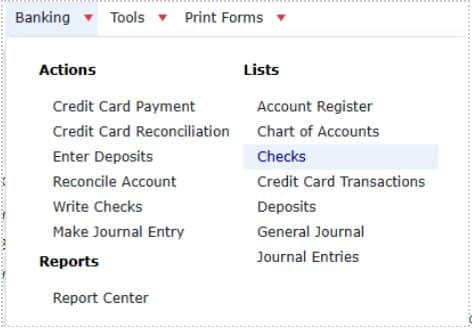
- From the “Where to” search bar, click on the search bar, and the type “Check List”.
 Search – Check List
Usage
The easiest way of using the commands available in this list is through the right click menu. 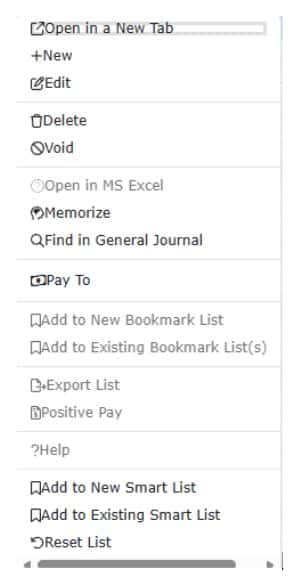 Pop-up Menu
- To create a new check, right click anywhere in the list and choose New from the pop-up menu, or click the “+ Check” button.
- To edit a check, double click the check, or right-click on it and choose Edit Check from the pop-up menu.
- To delete a check, right-click on it and choose Delete Check from the pop-up menu.
- Note: It may not always be possible to perform this action, depending on subsequent bank reconciliations and other historical events which have involved this transaction.
- To void a check, right-click on it and choose Void Check from the pop-up menu.
- Note: It may not always be possible to perform this action, depending on subsequent bank reconciliations and other historical events which have involved this transaction.
- To memorize a check, right-click on it and choose Memorize Check from the pop-up menu.
- To export whatever information is currently displayed in the list, right-click anywhere in the list and choose Export List from the pop-up menu.
- To modify which columns are displayed in the list, click the three dots on any column header, then select the “Columns” drop-down and select your desired columns.
IMPORTANT NOTE
DO NOT CREATE CHECKS FROM THE CHECK LIST FOR ANY OF THE FOLLOWING: (See the individual Help Topic for each of the following).
- Paying Employees – Use the Process Pay Group form.
- Paying Sales Tax – Use the Pay Sales Tax form.
- Paying Payroll Taxes and Liabilities – Use the Pay Payroll Liabilities form.
- Paying Bills Already Entered Using the Enter Bills Form – Use the Pay Bills form.

